Expense Reimbursement
Regions that pay event hosts back for what they spend — venue hire, supplies, catering — can run the whole exchange in Lumieos. Hosts file an itemised report with receipts attached, you review it, and the payout is tracked from decision through to paid.
Note: Lumieos does not move any money. The module records what was claimed, what you decided, and when you paid it. The payment itself happens however your region normally pays people — bank transfer, cheque, or handing over cash.
The feature is off by default. Nothing appears for hosts or admins until you turn it on.
Turning it on
Go to Region Management > Configuration > People & Access > Modules and switch on Expense Reimbursement. This tab saves each switch the moment you flip it — there is no Save button.
Turning it on requires partner administrator. Note that the two halves of this feature have different bars: a Partner Representative with Manage commerce can review and decide reports, but cannot turn the module on or off.
While it is off:
- The Expenses entry is hidden from every host’s sidebar.
- A host cannot create a report even by URL.
- Reports that already exist are untouched.
That last point matters if you switch it off mid-season. Existing reports are not deleted or changed — hosts simply lose the way in, while the Reimbursements tab still lists them for you.
Choosing payout methods
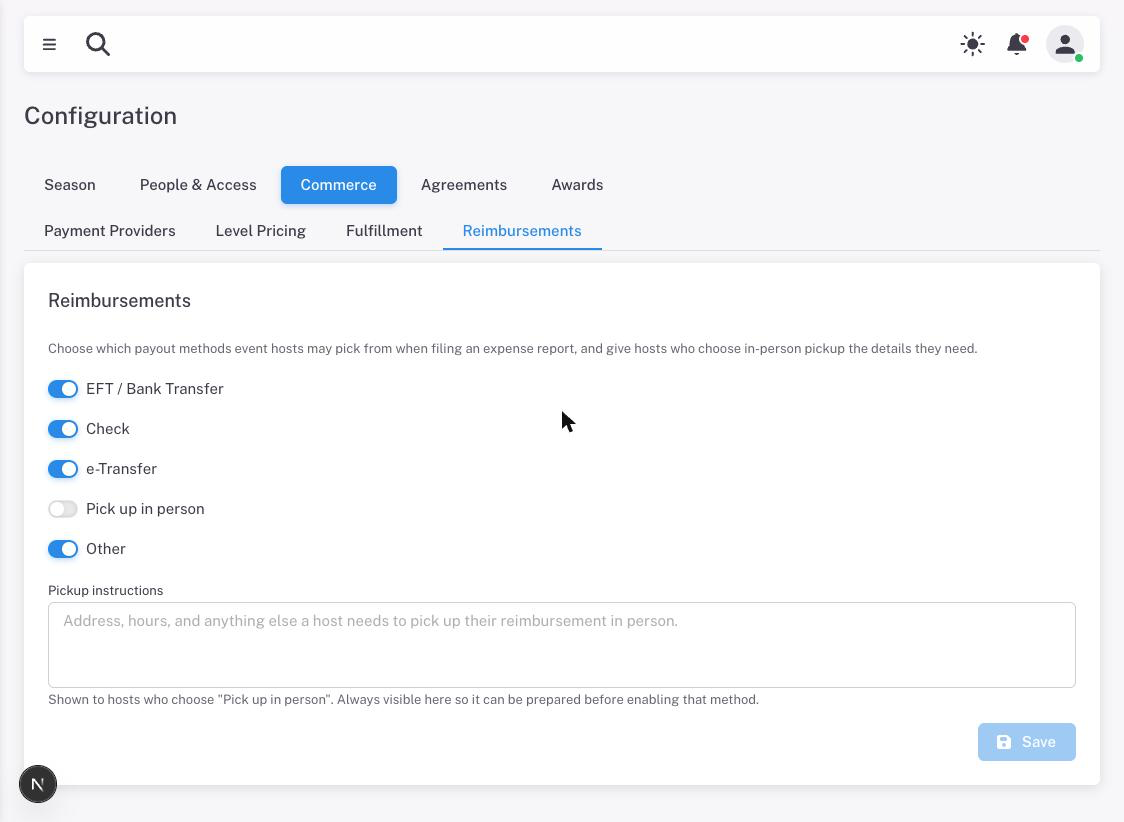
Go to Region Management > Configuration > Commerce > Reimbursements. These are the methods a host may pick from when filing:
- EFT / Bank Transfer
- Check
- e-Transfer
- Pick up in person
- Other
All except Pick up in person are on for a new region. Pickup is off deliberately, because it needs instructions before it is any use to a host.
The Pickup instructions box is where you tell hosts the address, the hours, and anything else they need to collect a payment in person. It is always visible, so you can write it before enabling the method. While Pick up in person is switched on, instructions are required.
Unlike the Modules tab, everything here saves together — the Save button stays disabled until you change something.
Note: Think carefully before disabling a method mid-season. A host who has a draft saved against a method you later switch off is refused when they try to submit, and has to come back and change it.
Reviewing reports
Reports arrive under Region Management > Commerce > Reimbursements. Reviewing them requires Manage commerce and a verified session — you will be asked for your two-factor code before you can act on anything.
Four figures sit across the top:
| Card | Counts |
|---|---|
| Pending Review | Waiting on you — submitted, plus anything you have sent back for changes |
| Approved | Everything approved but not yet paid, wherever it sits on the payout path |
| Reimbursed | Finished and paid |
| Total Reimbursed | What those finished reports came to |
Filter the list by status, by event, or by host name.
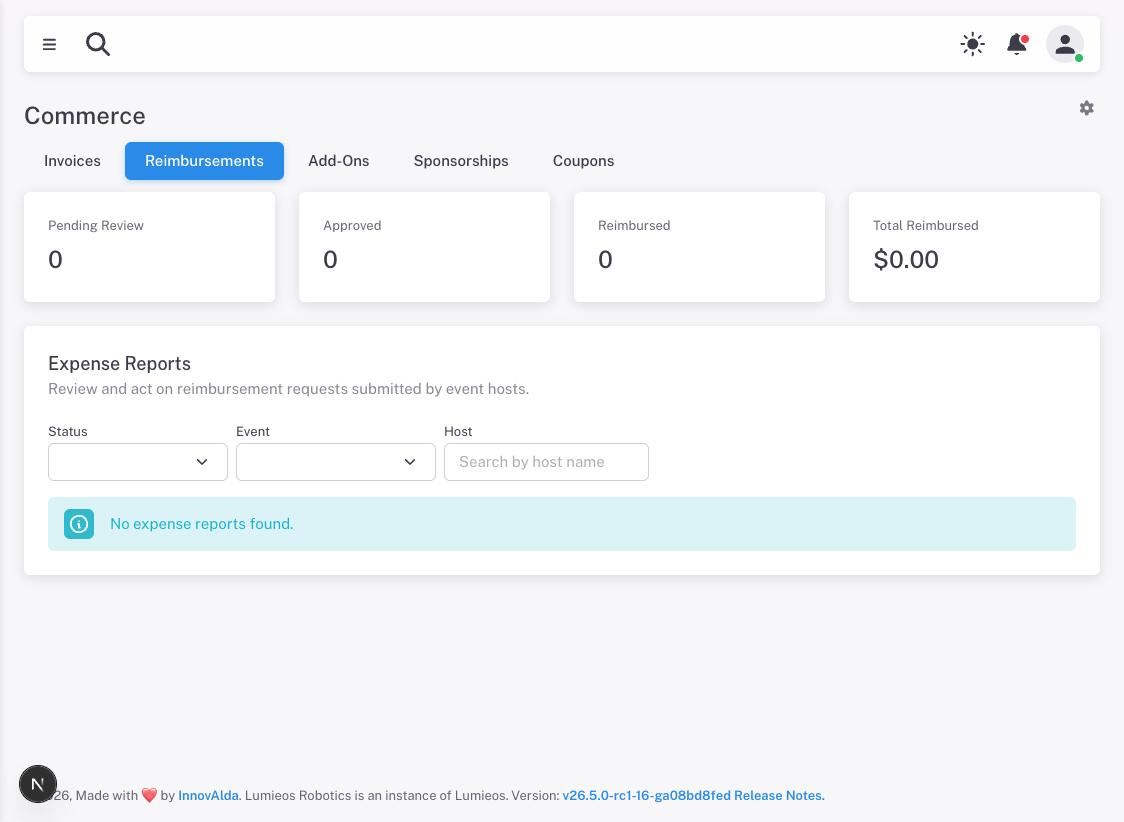
Note: A host’s draft never appears here. Their working copy stays private until they submit it, so an empty list does not mean nobody is preparing anything.
Deciding a report
Open a report to see its line items, each receipt, the payout details the host gave, and a running activity timeline. Then:
- Approve — you accept the claim and owe the money.
- Request Changes — send it back with a comment explaining what you need. The host can edit and resubmit.
- Reject — decline it. This is final; a rejected report cannot be reopened.
A comment is the only way the host learns why, so say what you need rather than sending it back bare.
Tracking the payout
Once approved, move the report along as you actually pay it:
- Mailed — a cheque is in the post.
- Available for Pickup — it is ready to collect.
- Reimbursed — the host has the money. This is the end of the line.
You can go straight from Approved to Reimbursed if there is nothing in between, which is usually what happens with a bank transfer. Mailed and Available for Pickup exist so a host can see their payment is on its way rather than wondering whether you forgot.
The full path
A report only moves forwards, and only along these routes:
Draft ──▶ Submitted ──┬──▶ Approved ──┬──────────────▶ Reimbursed
  (host)     (host)   │    (you)      ├─▶ Mailed ─────▶ Reimbursed
                      │               └─▶ Available ───▶ Reimbursed
                      │                   for Pickup
                      ├──▶ Changes Requested ──▶ Submitted ...
                      │        (you)               (host)
                      └──▶ Rejected
                               (you)
Rejected and Reimbursed are final. Everything else can still move.
Hosts can only edit a report while it is a Draft or after you have requested changes — once submitted, it is frozen until you act, so what you review cannot change under you.
What hosts see
The other half of this is documented for hosts at Event Host: Expense Reimbursement. It is worth reading before you enable the module, so you know what you are asking them to do.