Dashboard & Action Items
For: All roles
The dashboard is the first page you see after logging in to Lumieos. It gives you a summary of what needs your attention and quick access to the most common areas of the platform.
The Dashboard
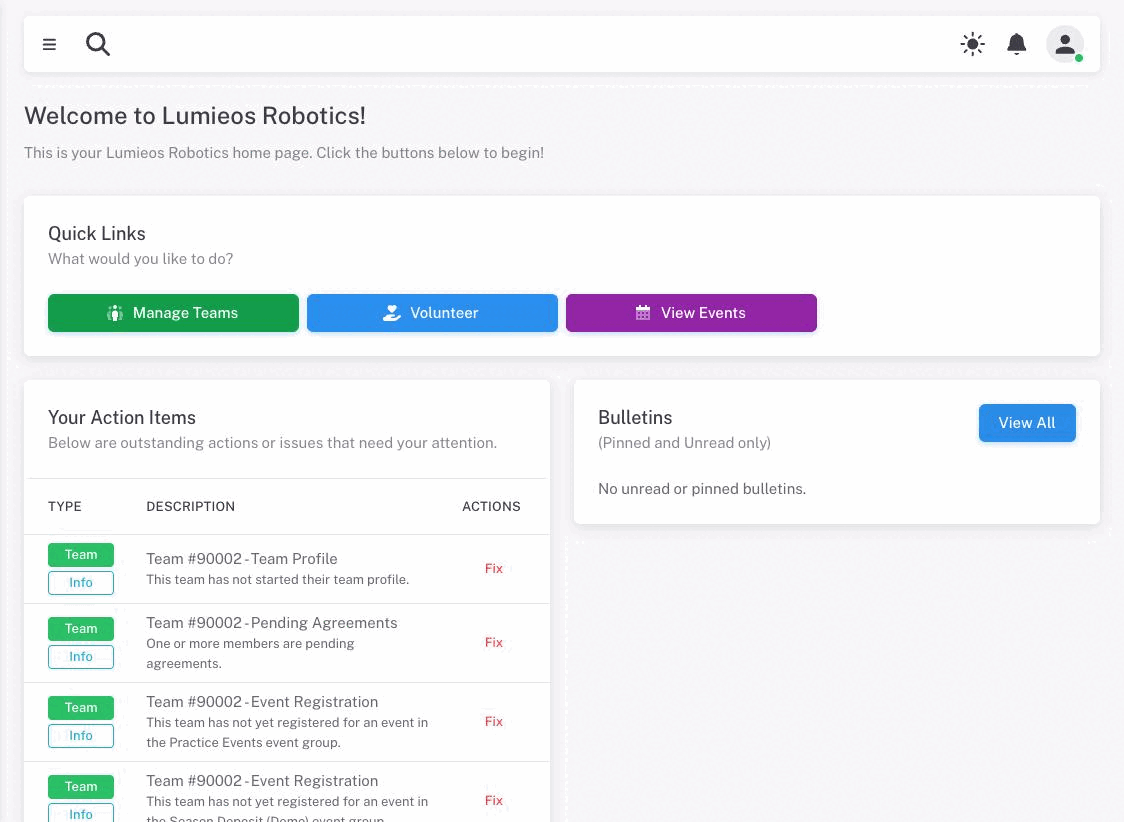
The dashboard is organized into several sections:
- Welcome message — A greeting that confirms you are in the right place.
- Events in Progress alert — If an event is currently running, a banner appears at the top with links to the live scores and rankings for each active event.
- Quick Links — A row of buttons for fast navigation to the most common areas.
- Your Action Items — A list of outstanding tasks or issues that require your attention.
- Bulletins — Recent announcements and pinned messages from your program.
Quick Links
The Quick Links card contains navigation buttons for the areas you will visit most often. The buttons available to you depend on your role:
| Button | Available to |
|---|---|
| Manage Teams | All users with a team |
| Volunteer | All users |
| Event Day | Users with Event Day permissions |
| View Events | All users |
| Manage Region | Partner/region admins |
Click any button to go directly to that section.
Action Items
The Your Action Items card lists outstanding tasks and issues that need your attention. When you have no action items, the card displays “No action items! Hooray!” — this means everything is in order.
Each action item has three columns:
- Type — Two badges showing the area the item belongs to and its severity.
- Description — A title and a short explanation of what is wrong or what needs to be done.
- Actions — A Fix button that takes you directly to the relevant page to resolve the issue.
Area badges
Action items are grouped by the part of the platform they relate to:
| Badge | Color | What it covers |
|---|---|---|
| Team | Green | Roster requirements, agreements, event registration, payments |
| Account | Pink | Your personal account — background check, YPP status |
| Volunteer | Blue | Volunteer screening and certification requirements |
| Event | Purple | Event-related tasks |
Severity badges
Each action item also carries a severity level:
| Badge | Meaning |
|---|---|
| Critical | Must be resolved — your team may be unable to register for or participate in events until this is fixed |
| Warning | Needs attention soon — something is incomplete or at risk |
| Info | Informational — a step is pending but not yet blocking |
Account action items
Account-level items relate to your personal profile and appear regardless of which team you are on.
- Background Check Required (Critical) — You are listed as a coach or volunteer but have not completed the required Youth Protection Program (YPP) background check through FIRST. Your team cannot register for events until this is resolved.
- YPP Requirements Not Met (Warning) — Your background check is on file, but additional steps (such as agreements) are still pending in the FIRST system.
- Certification Not Completed (Critical, Volunteer area) — You have been assigned to a volunteer role that requires a certification test, and you have not yet completed it.
Team action items
Team items appear for each team you are associated with in the current season. The team number is included in the title so you can tell which team each item belongs to if you are on more than one.
| Item | Severity | What it means |
|---|---|---|
| Roster Issue — below minimum | Critical | Not enough members of a required type are on the roster (e.g. not enough coaches) |
| Roster Issue — above maximum | Critical | Too many members of a given type; this can affect eligibility for events and awards |
| Invited Coaches | Info | One or more people have been invited to the team but have not yet accepted |
| Pending YPP | Info | One or more coaches are awaiting background check completion with FIRST |
| Pending Agreements | Info | One or more team members have not yet signed required agreements |
| Team Profile | Info | The team has not started their judging/team profile |
| Pending Jotform | Info | A required Jotform submission has not been marked as complete. The Fix button opens the Jotform itself rather than a Lumieos page |
| State Requirements | Critical | A coach has not completed California Live Scan, Mandated Reporter Training, or the BCIA 9018 form |
| BCIA 9018 Form | Info | The BCIA 9018 form becomes required on a date named in the item, and does not look to be on file yet. A heads-up, not yet a blocker |
| Event Preference Selection | Info | Preference registration is open and the team has not yet selected preferences |
| Event Registration | Info | Registration is open and the team has not yet registered for an event |
| Payment Issue — advance payment required | Critical | The team selected preferences but the event level requires payment before registration is finalized. The item names the deadline — preferences submitted without payment are rejected when the window is processed |
| Payment Issue — post-registration fee unpaid | Critical | The team is registered but has not paid the required event fee by the deadline |
| Deadline Extended | Info | Your region has extended this team’s payment deadline. Payment is still outstanding |
Note: Team action items do not appear for teams marked as not participating, or for draft teams that have not yet been paid for.
Resolving action items
Click the Fix button on any action item to go directly to the page where you can resolve it.
Action items clear as soon as the underlying change is saved, so resolving one and coming back to the dashboard should show it gone.
Note: Before 26.5, an item could stay listed for up to ten minutes after you had dealt with it. If you are on an older version and see that, the item really is resolved — the dashboard just has not caught up yet.
The count of outstanding action items also appears as a red badge on Home in the sidebar, so you can see at a glance whether anything needs you without opening the dashboard.
Bulletins
The Bulletins card on the dashboard shows a filtered view of announcements: only bulletins pinned by your region administrators and bulletins you have not yet read are shown here. This keeps the dashboard focused on what is new or important.
The card header shows (Pinned and Unread only) to remind you that this is not the full list. To see all bulletins and past messages, click the View All button in the top-right corner of the card, which takes you to the full Conversations section.
If there are no pinned or unread bulletins, the card shows “No unread or pinned bulletins.”