Your Notification Preferences
Some region notifications are opt-in: each staff member chooses for themselves whether to receive them. The Notifications page gathers every one of those choices in one place, shows what you currently receive, and lets you switch each on or off.
Open it from Region Management > Notifications in the sidebar navigation.
Admin URL:
Everything on this page is yours alone. Changing a switch never affects what another administrator receives, and the page never shows anyone else’s choices.
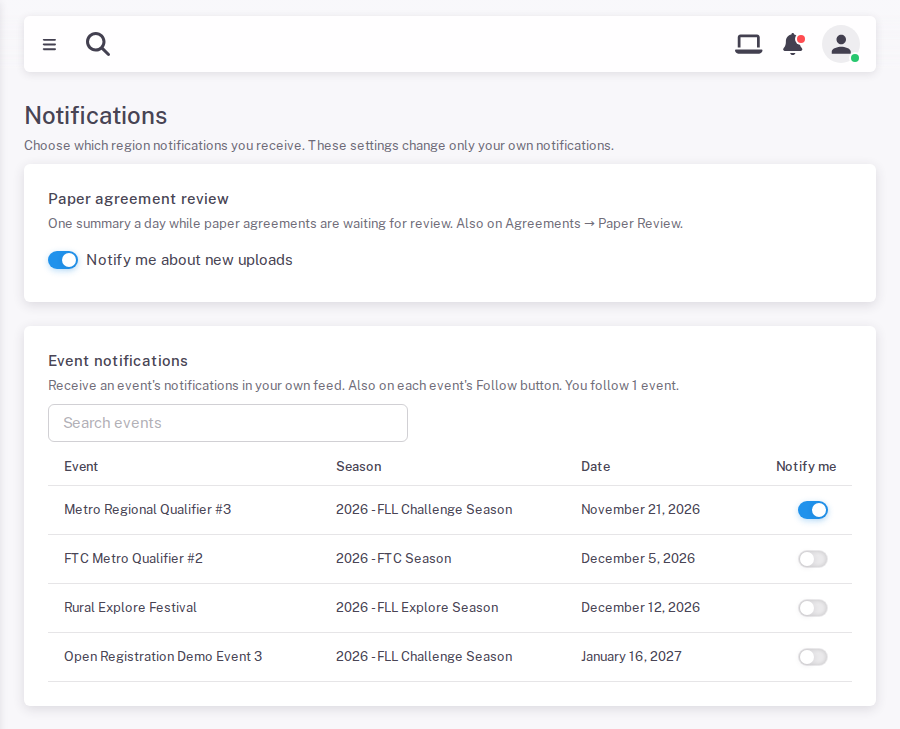
Paper Agreement Review
Turn on Notify me about new uploads to get one Paper agreements awaiting review summary while scanned paper agreements are waiting for review. The count in the summary updates as more uploads arrive, and you get at most one new summary a day. See Reviewing uploaded paper forms.
This is the same switch as the one at the top of Agreements → Paper Review: turning it on or off in either place changes both. Only Primary Administrators and Administrators can receive these summaries; for anyone else the page says so instead of showing a switch.
Event Notifications
The table lists the events you follow first, then every other upcoming or ongoing event this season that your region permissions let you see. Draft events appear only if you can manage them or have been given access to them. Turn on Notify me for an event to receive its notifications (registrations, volunteer activity, agreement uploads, and so on) in your normal notification feed. Use the search box to find an event by name or season.
This is the same setting as the Follow notifications button on an event’s manage page: following or unfollowing in either place changes both. See Following an Event’s Notifications.
If you also manage the event, following it tells you when a team replies to one of its bulletins. See Replies to bulletins.
If your permissions no longer cover an event you follow, it stays in the list so you can still switch it off, but you cannot follow it again. Follows are cleared automatically when the season is archived.
Note: Event managers receive their own events’ notifications automatically, whether or not they follow them. Notifications that are not opt-in are not listed here.