Judge — Quick Card
Device: the room’s tablet (shared, or one each), or your phone · Ask: the judge advisor
Your job: run each session on time, enter the rubric scores and feedback for each team, and finish before the next team arrives.
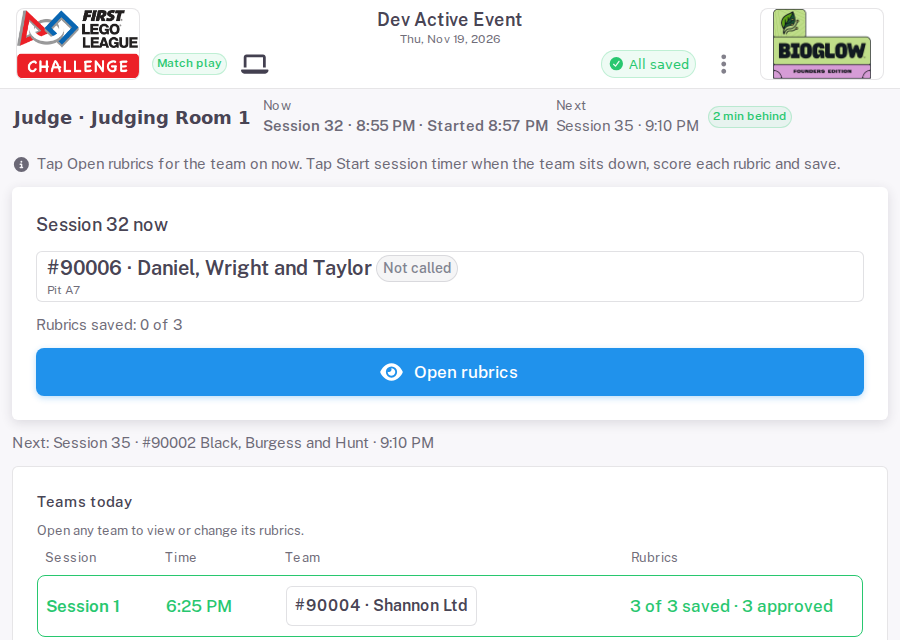
Start
- Tap Open <event name>. The tablet opens on Judge.
- The first time, pick which room this is. If it’s wrong, tap the room name in the header and change it.
Each session
- The screen shows the session on now and whether the team is here. Tap Open rubrics.
- When the team sits down, press Start session timer at the top of the rubrics. Press it on one device only; the others in the room with that team open show the same time. Tapped by mistake? Undo start works for 10 seconds; after that, ask the Judge Advisor to cancel or restart the timer. Beside the session time, Section shows the part of the session you’re in and the time left for it. Finished a section early? Tap a later section to start it now. This changes only the section time on your device; the session time keeps running. The timer stays at the top of the screen as you scroll down the rubric.
- Fill in each rubric for the team; switch rubrics with the tabs. Your work is saved on the tablet as you go.
- Check the answers with the other judges, then tap Save rubric. The judge advisor approves the feedback later.
- Before the next team, check Unfinished rubrics. Teams today opens any team from today to view or change its rubrics.
If…
| Situation | Do |
|---|---|
| Two judges edited the same rubric | You’re asked which version to keep. Agree in the room, then choose. |
| The tablet relaunched or you lost Wi-Fi mid-rubric | Open it again; the rubric comes back as you left it. |
| The status line shows pending | Keep going. It sends when the network is back. |
| A banner says the schedule changed | Finish the rubric you’re on. Nothing you typed is lost. |
| The team didn’t arrive | Tell the judge advisor. Only the judge advisor marks a session no-show. |
| A warning says Also open on … | Another device has the same rubric open. Agree in the room who saves; whoever saves second chooses which version to keep. |
| Deliberations have started | The station shows Deliberations, My scripts and Sessions tabs. Use Sessions to finish a rubric. |
Before your room’s last session ends, make sure every rubric shows as saved. After the event’s end time the tablet only finishes sending what you saved before it; anything new you enter is refused.
Last updated on