Head Referee — Quick Card
Device: your phone or a tablet, while you walk the fields · Ask: the event lead
Your job: settle disputes, rule on no-shows and replays, and fix scoring mistakes so every played match has one correct score.
Start
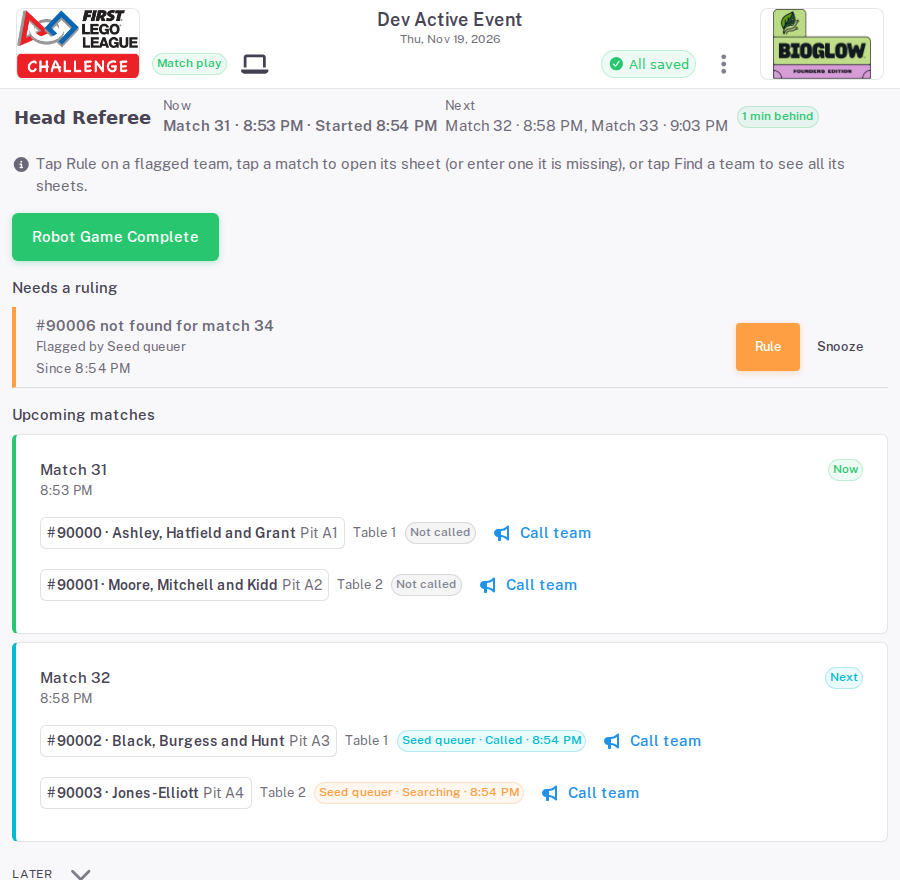
Open Head Referee from the event-day menu. The top of the page is your attention list: things that need you, with the newest first. Items disappear by themselves once they’re handled.
What lands on your list
- No Show flags from the queuers. Check, then rule. Only your ruling makes a no-show official.
- Replays and sheets waiting for a decision.
- Recent edits and overrides, so a second person can see what changed.
Calling a team to the table
Under Upcoming matches, tap Call team next to a team that is needed at its table. The announcer gets the call, and the queuers see Head Referee needs #123 at Red 1 on that team’s card. The row then shows Called <time> by <name> instead of the button. The call belongs to that match: once the team’s score for it is in, or a later match starts, the call ends by itself and Call team comes back for the team’s next match. Before then, the announcer or a queuer can clear it.
Fixing a score
- Open the result. Its history shows who submitted it, when, and every change.
- Edit the sheet, or mark it as a replay. Delete asks you to confirm, and a deleted result can be restored from its history.
- To override a score, give a reason. Rankings use the override, and the original stays in the history.
- If a sheet went in under the wrong team, choose Move or swap and pick the team and match it belongs to. An open slot takes the sheet; a slot that already has a posted score swaps the two sheets. Only practice-to-practice or ranked-to-ranked moves are allowed. The score, answers, override and notes move with the sheet. The team’s initials or signature are cleared, because the wrong team gave them, so ask the right team to initial it. The sheet shows Moved by head referee, and the history keeps the original.
If…
| Situation | Do |
|---|---|
| A referee submitted a mistake | You fix it. Referees can’t change a submitted sheet. |
| Two scores for one team in one match | Keep the right one and delete the other. Tell the scorekeeper. |
| Two teams’ sheets went in under each other’s numbers | Open one of them, choose Move or swap, and pick the other team’s slot to swap them. |
| A referee’s tablet shows failed | Have the referee open it. If they are unsure, choose together. |
| The page is wrong for everyone | Tell the event lead. They decide on the fallback. |
Before the end of each session, make sure every played match has an active score for every team: the event lead checks this with you before the tablets hand over.