Joining or Adding a Team
For: Coaches, Team Admins, Mentors
Lumieos manages the association of users to teams using data from the national registration system. Users assigned to a team will appear on the roster with a role similar to the one assigned in the national system.
Note: It is not possible for users to add new teams directly. Lumieos uses report data uploaded by regions. If you have updated or registered a new team since the last import, Lumieos will not have the new data until the next upload. See the FAQ for more details.
Automatic Team Association
There are two ways to be automatically associated with a team once you and the team exist on a report from FIRST that has been uploaded by the region.
Email Matching When a Report is Uploaded
Whenever a region uploads a new report, Lumieos compares it to the last uploaded report and looks for changes. For newly added or replaced team representatives, Lumieos checks if the email address is associated with any verified emails in the system. That user is then automatically associated with the team and notified via email.
If a user does not yet exist in the system, an invite email is sent prompting them to create an account.
Email Matching When an Email is Verified
Lumieos also attempts to match a user’s email whenever a new email address is verified. This happens when a user adds an additional email to their account or during account creation.
If a user receives an invite and creates an account with the same email, Lumieos automatically associates the user with the team.
Manual Team Association
System-Generated Team Invites
If a user is not in the system when a report is processed, they receive an email invite. The system automatically attaches users to teams when a new account is created or a new email is verified.
User-Generated Team Invites
Applies to regions that let coaches invite other coaches. Pick your instance at the top of the page and this section will hide itself if it doesn't apply to you.
Some regions allow users to invite additional coaches above the two required by FIRST. The total number allowed is controlled on a per-region basis.
If the invited person already has a Lumieos account they get an in-app notification; if not, they get an email walking them through creating one. Either way the invitation waits for them on the Join a Team tab, where they Accept or Decline it — see Accepting an invitation.
Note: A team with an unaccepted invitation sits at Pending Lumieos Invites status and cannot register for events. If an invitation is never going to be accepted, delete it from the Roster tab rather than leaving it outstanding.
Creating a Team Directly
Applies to regions that run team signups through Lumieos. Pick your instance at the top of the page and this section will hide itself if it doesn't apply to you.
Regions that form teams in Lumieos rather than starting from FIRST registration let you create the team yourself. You supply the team name, city, state or province and your own role, and Lumieos creates the team as a Draft with no team number.
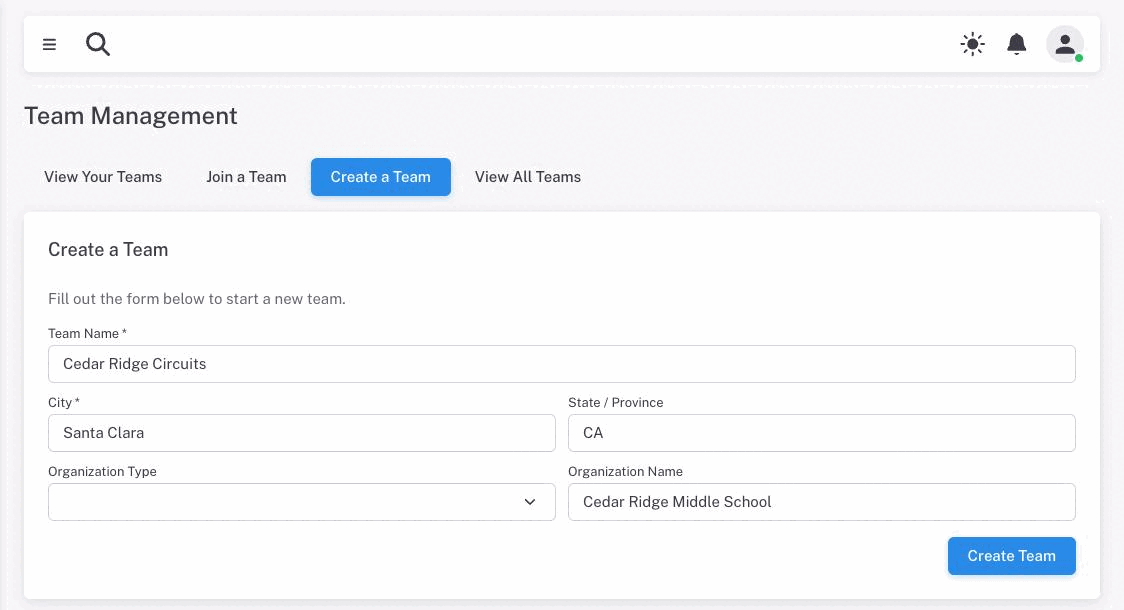
A draft team is not active and cannot register for events. Open it and use Pay & Register in the team header to settle the registration fee; the team number is assigned when that invoice is paid.
Everything else on this page — email matching, system invites — applies to teams that come from FIRST data.