Schedule CSV Format
For: Event administrators and partners who import schedules or create schedule templates.
Lumieos uses a CSV format to define event schedules — robot game matches, judging sessions, table groups, judging rooms, queuing zones and, for event imports, pit locations. The same format is used for both direct event imports (with real team numbers) and reusable templates (with placeholder team numbers).
Prefer not to write CSV? Schedule templates can now be created and edited with a guided wizard — open the Schedule Templates tab and choose Create with Wizard (or Edit with wizard on an existing template). The wizard walks through configuration, venue layout, matches, judging sessions, and queuing zones, and produces the same validated format described on this page. CSV remains available for templates and advanced editing.
Quick Start
Here is a minimal 4-team schedule with all supported sections:
robot_game_rounds,3
table_group,Table A1,Table A2
match_list,time,length,Table A1,Table A2
1,9:00,10,1,2
2,9:10,10,3,4
3,9:20,10,2,3
4,9:30,10,4,1
5,9:40,10,1,3
6,9:50,10,2,4
judging_group,CJ|Room 1
judging_group,CJ|Room 2
judging_list,time,length,block,Room 1,Room 2
1,10:00,30,1,1,2
2,10:45,30,2,3,4
queuing_zone,r,Match Queuing,Table A1,Table A2
queuing_zone,s,Judging Queuing,Room 1,Room 2
The rest of this page explains each section in detail.
Pasting from a spreadsheet. You can paste rows copied straight from a spreadsheet. Spreadsheets copy cells separated by tabs instead of commas, and Lumieos reads either form. Each row must still start with a row type (such as table_group) or a match or session number. A row Lumieos does not recognise, such as a title line, is reported as an error rather than left out.
Configuration Rows
Configuration rows appear at the top of the file and set global schedule parameters.
| Row | Format | Default | Description |
|---|---|---|---|
robot_game_rounds | robot_game_rounds,<integer> | 3 | Number of official (scored) matches per team |
robot_game_practice_rounds | robot_game_practice_rounds,<integer> | 0 | Number of practice matches per team |
number_of_teams | number_of_teams,<integer> | 0 | Total team count for the template. Optional: when omitted (or lower), the count is derived from the highest team number actually assigned in match/session rows. Lets a template declare its size before any slots are assigned. |
All values must be non-negative integers. If omitted, defaults are used.
Example:
robot_game_practice_rounds,1
robot_game_rounds,3
Table Groups
Table groups define pairs of robot game tables. Each table_group row creates one pair.
Format: table_group,<table_name_1>,<table_name_2>
Rules:
- Each group must have exactly two table names
- Table names must be unique across all groups — no duplicates
- These names are referenced by the
match_listheader andqueuing_zonerows
Example:
table_group,Red Table R1,Red Table R2
table_group,Blue Table B1,Blue Table B2
This defines 4 tables in 2 groups.
Table colours on the arena display
Each table can have a colour, which the arena display shows behind the table’s name on the teams and timer views, so the audience can match a team to its table. Open the event’s schedule (Events → Schedules, then the event) and pick a colour for each table in the Robot Game Tables card. The colour is saved as soon as you pick it.
Colours can be changed while the schedule is locked, because they only change the display. Re-importing the schedule or applying a template keeps the colour of every table whose name in the file stays the same, even if the table was renamed on the event.
Match List
The match list defines robot game matches. It starts with a header row followed by data rows.
Header Row
Format: match_list,time,length[,<practice_column_name>],<table_1>,<table_2>,...
- The
timeandlengthlabels are fixed column headers - A practice column appears only if
robot_game_practice_roundsis greater than 0 — the column name can be anything (e.g.,Practice) - Table names must match names defined in
table_grouprows
Example (with practice):
match_list,time,length,Practice,Red Table R1,Red Table R2,Blue Table B1,Blue Table B2Example (without practice):
match_list,time,length,Table A1,Table A2Data Rows
Format: <match_number>,<HH:MM>,<length_minutes>[,<practice_flag>],<team_1>,<team_2>,...
| Column | Type | Description |
|---|---|---|
| Match number | Positive integer | Sequential match identifier |
| Time | HH:MM or H:MM AM/PM | Start time, 24-hour (13:30) or 12-hour (1:30 PM) |
| Length | Positive integer | Duration in minutes |
| Practice flag | p or practice | Only present when practice column exists. Marks the row as a practice match. Leave empty for official matches. |
| Team columns | Positive integer or empty | One column per table. Team number assigned to that table, or empty for no assignment. |
Notes:
- Zero or negative team numbers are treated as placeholders and skipped
- Empty rows (all team columns empty) represent breaks or buffer time
- The practice flag column only exists when
robot_game_practice_rounds > 0
Example:
1,9:00,10,p,1,2,3,4
2,9:10,10,p,5,6,7,8
3,9:20,5,,,,
4,9:25,10,,1,5,2,6
Rows 1-2 are practice matches. Row 3 is a 5-minute break. Row 4 is an official match.
Judging Groups
Judging groups define rooms where teams are evaluated. Each judging_group row creates one group with one or more rooms.
Format: judging_group,<type>|<name>[,<type>|<name>,...]
Each room entry uses type|name format.
Room Types
| Type | Description |
|---|---|
cv | Core Values |
pj | Project |
rd | Robot Design |
cj | Judging (combined) |
rv | Reviewing |
gia | Global Innovation Award |
Room types are case-insensitive (stored as lowercase).
Rules:
- Room names must be unique across all judging groups — no duplicates
- These names are referenced by the
judging_listheader andqueuing_zonerows
Example (one room per group):
judging_group,CJ|Yellow Pod 1
judging_group,CJ|Red Pod 2
judging_group,CJ|Green Pod 3
judging_group,CJ|Blue Pod 4
Example (multiple rooms per group):
judging_group,CV|Core Values Room,PJ|Project Room
judging_group,RD|Robot Design Room
Changing rooms after an import
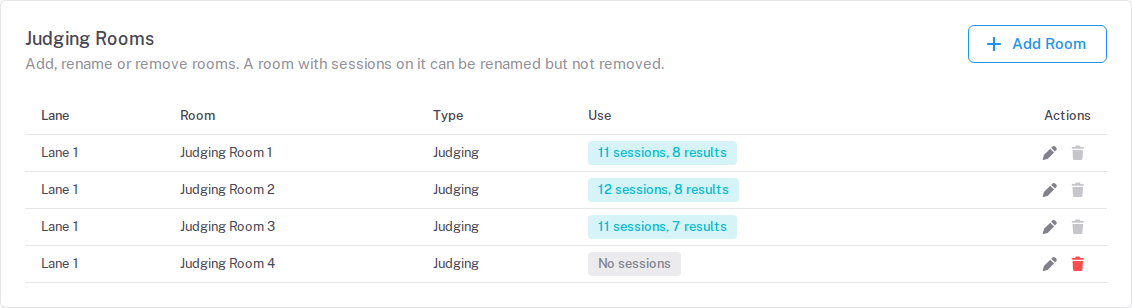
Re-importing a schedule or applying a template replaces every room. To add, rename or remove a single room instead, open the event’s schedule (Events → Schedules, then the event) and use the Judging Rooms card (Reviewing Rooms outside FLL Challenge).
- Add Room adds a room to an existing lane or to a new lane. Choose its name and type.
- Edit renames a room. A room’s type can only be changed while nothing is scheduled in it.
- Remove is only available for a room with no sessions and no submitted results, so removing a room never deletes scheduled teams or rubrics. To free a room in use, move its teams to another room or clear the schedule.
Room names must be unique on the event’s schedule. Nothing can be changed while the schedule is locked.
Event hosts can also rename tables and rooms from their Manage Event page, if the template or uploaded schedule allows it; see Letting event hosts rename tables and rooms. Names changed there survive a re-import or a template re-apply.
Judging List
The judging list defines judging sessions. It starts with a header row followed by data rows.
Header Row
Format: judging_list,time,length,block,<room_1>,<room_2>,...
- The
time,length, andblocklabels are fixed column headers - Room names must match names defined in
judging_grouprows
Example:
judging_list,time,length,block,Yellow Pod 1,Red Pod 2,Green Pod 3,Blue Pod 4Data Rows
Format: <session_number>,<HH:MM>,<length_minutes>,<block_number>,<team_1>,<team_2>,...
| Column | Type | Description |
|---|---|---|
| Session number | Positive integer | Sequential session identifier |
| Time | HH:MM or H:MM AM/PM | Start time, 24-hour (13:30) or 12-hour (1:30 PM) |
| Length | Positive integer | Duration in minutes |
| Block | Integer | Judging block/timeslot grouping |
| Team columns | Positive integer or empty | One column per room. Team number assigned to that room, or empty. |
Example:
1,9:30,30,1,1,2,3,4
2,10:15,30,2,5,6,7,8
3,11:00,30,3,9,10,11,12
Queuing Zones
Queuing zones define areas where teams wait before their activities. Each zone references tables or judging rooms.
Format: queuing_zone,<type>,<zone_name>,<location_1>[,<location_2>,...]
| Type | Description | Location references |
|---|---|---|
r | Robot game queuing | Table names from table_group rows |
s | Judging/session queuing | Room names from judging_group rows |
Rules:
- Each location name must match a previously defined table name (for type
r) or room name (for types) - A zone can reference multiple locations
Example:
queuing_zone,r,Robot Game Queuing,Red Table R1,Red Table R2,Blue Table B1,Blue Table B2
queuing_zone,s,Judging Queuing,Yellow Pod 1,Red Pod 2,Green Pod 3,Blue Pod 4
Changing queuing zones after an import
Re-importing a schedule or applying a template replaces every queuing zone. To add, change or remove a single zone instead, open the event’s schedule (Events → Schedules, then the event) and use the Queuing Zones card.
- Add Zone creates a zone. Choose its name, whether it queues for Robot Game or Sessions, and tick its tables or rooms.
- Edit renames a zone or changes its tables or rooms. A zone’s type is fixed: to switch it, remove the zone and add a new one.
- Remove deletes the zone only. Teams’ queuing statuses stay with the schedule, and a tablet open on the zone shows that it is no longer part of the event.
Zones can be changed while the schedule is locked and during the event, so a zone forgotten at setup can be added on the day. Zone names must be unique on the event. Only staff who can edit the event’s schedule can change zones. Each zone change moves the schedule’s version number by one, so printed schedules show an older version even though no times or teams changed.
Pit Locations
An event import can also say where each team sits in the pits. Event staff see the pit on the team check-in card on event day and can still change it there.
Format: pit_location,<team_number>,<pit>
Rules:
- One row per team, anywhere in the file; the team must be registered for the event
- The pit is free text of up to 50 characters (put it in quotes if it contains a comma)
- Teams without a row keep the pit they already have, so importing a new schedule never clears pit locations
- Templates cannot contain
pit_locationrows, because their team numbers are placeholders
Example:
pit_location,59366,A1
pit_location,60120,A2
pit_location,61455,"B4, by the door"
Templates vs. Event Imports
The CSV format is the same for both use cases, with one difference: how team numbers work.
Event Import
When uploading a CSV directly to an event, team numbers must be real team numbers that are registered for that event. The system validates each number against the event’s registration list. Unregistered team numbers produce an error.
Upload CSV on an event’s Add Schedule dialog imports the file as the event’s schedule. Lumieos checks the whole file first. If any row has an error, nothing is imported and the event’s schedule does not change. If the event already has a schedule, the dialog warns you and the button reads Replace Schedule: the import replaces the whole schedule, and any pit_location rows set those teams’ pits. A schedule that is locked cannot be replaced.
Templates
When creating a reusable schedule template, use placeholder team numbers starting at 1 and incrementing sequentially: 1, 2, 3, …, N. The sequence must be continuous with no gaps.
When you apply a template to an event, each placeholder is mapped to a real registered team.
Example: A template for 24 teams uses numbers 1 through 24. When applied to an event, placeholder 1 might become team 59366, placeholder 2 becomes team 60120, and so on.
Checking the team mix. Randomize fills every placeholder with a random draw. To check the draw before you apply it, turn on Show team details. Each assigned team then shows its organization and city, rookie teams are marked, and teams that share a coach or assistant coach show the same Shared coach number. Lumieos matches coaches by the email on the team’s FIRST registration and does not show their names. Change any placeholder by hand before you apply the template.
Fewer teams than the template. Leave the extra placeholders unmapped. Their matches and judging sessions stay on the schedule as open positions, one per placeholder. When you later move a team into the event, Lumieos lists each open position with its match and judging session numbers. You can fill the positions one team at a time, in any order. A schedule applied before 26.7 can offer an open position only while a single placeholder is still unmapped.
Check the warnings before applying. The team assignment step warns when the template is sized for a different number of teams than are registered for the event, when any placeholder has no team, and when a registered team is not placed in the schedule, listing those teams. A team left out gets no matches or judging sessions. The warnings do not stop you from applying, so you can still leave open positions on purpose.
Applied the wrong template? Clear the schedule, then apply the right one. Use the trash button on the event’s row under Events → Schedules, or Clear Schedule on the event’s schedule page. Clearing removes every match, judging session, table, room and queuing zone, along with anything recorded against them and the event’s schedule settings, and the event shows No Schedule again. The next schedule you apply starts again at revision 1. It cannot be undone, and it is not available while the schedule is locked. Applying another template to the event also replaces its schedule.
Troubleshooting
Common errors and how to fix them:
Duplicate table or room names
Row 5: Duplicate table name 'Red Table R1' found.Every table and room name must be unique across the entire file. Check for copy-paste errors in table_group and judging_group rows.
Invalid time format
Row 12: Match row contains invalid time.Times must be hours and minutes, either 24-hour (9:00, 13:30) or 12-hour with AM or PM (9:00 AM, 1:30 PM). Do not include seconds. A 12-hour time needs an hour from 1 to 12, so 13:00 PM is refused.
Invalid numbers
Row 8: Match row contains invalid match number.
Row 14: Session row contains invalid length.
Match numbers, session numbers, lengths, and block numbers must all be integers. Check for accidental text or decimal values.
Table or room not found in header
Row 7, column 4 ('Table X'): Could not find table 'Table X' when processing match header row.The table or room name in the match_list or judging_list header does not match any name from the table_group or judging_group definitions. Check for typos or extra spaces.
Queuing zone references unknown location
Row 20, column 3 ('Pod X'): Could not find judging room 'Pod X' in queuing zone.Each location in a queuing_zone row must exactly match a table name (for type r) or room name (for type s) defined earlier in the file.
Unregistered team number (event import)
Row 10, column 'Red Table R1': Team number 99999 is not registered for this event.When importing directly to an event, every team number must belong to a team that is registered for that event. Verify the team is registered before importing.
Non-continuous team sequence (templates)
Generic team numbers must be a continuous sequence from 1 to 24. Issues: missing: [5, 12]Template placeholders must form a continuous 1-to-N sequence. If you have 24 teams, every number from 1 to 24 must appear at least once. Check for missing or skipped numbers.
Row not recognised
Row 1: 'Regional qualifier' is not a row type the schedule CSV recognises. Values: Regional qualifier,,,The error ends with the row’s contents after Values:, so you can find the row. Every row must start with one of the row types on this page, or with a match or session number below a match_list or judging_list header. Remove title lines and notes, or move them out of the first column.
No matches or judging sessions
The CSV has no match or judging session rows, so there is no schedule to save.A template or import must contain at least one match or judging session. Check that the match_list and judging_list headers are followed by their rows.
Missing required values
Row 1: robot_game_rounds requires a value.Configuration rows like robot_game_rounds and robot_game_practice_rounds require an integer value after the comma.
Full Validation Rules
This is a comprehensive list of every validation rule enforced by the parser.
File
| Rule | Error |
|---|---|
| Every row must be a known row type, or a match or session row under its header | Row N: 'X' is not a row type the schedule CSV recognises. Values: <row> |
| At least one match or judging session row | The CSV has no match or judging session rows, so there is no schedule to save. |
Configuration
| Rule | Error |
|---|---|
robot_game_rounds must have a value | Row N: robot_game_rounds requires a value. |
| Value must be an integer | Row N: Robot Game rounds must be an integer. |
robot_game_practice_rounds must have a value | Row N: robot_game_practice_rounds requires a value. |
| Value must be an integer | Row N: Robot Game practice rounds must be an integer. |
Table Groups
| Rule | Error |
|---|---|
| Must have at least two table names | Row N: table_group requires at least two table names. |
| Both names must be non-empty | Row N: table_group requires two non-empty table names. |
| No duplicate table names | Row N: Duplicate table name 'X' found. |
Match List Header
| Rule | Error |
|---|---|
Table names must exist in table_group definitions | Row N, column C ('X'): Could not find table 'X' when processing match header row. |
Match Data Rows
| Rule | Error |
|---|---|
| Match number must be an integer | Row N: Match row contains invalid match number. |
| Time column must be present | Row N: Match row is missing time column. |
| Time must be in HH:MM format | Row N: Match row contains invalid time. |
| Length column must be present | Row N: Match row is missing length column. |
| Length must be an integer | Row N: Match row contains invalid length. |
| Team numbers must be integers | Row N, column 'X': Match row contains invalid team number 'Y'. |
| Teams must be registered (event mode) | Row N, column 'X': Team number Y is not registered for this event. |
Judging Groups
| Rule | Error |
|---|---|
Room entries must be in type|name format | Row N, column C: Judging room must be in 'type|name' format, got 'X'. |
| No duplicate room names | Row N, column C: Duplicate judging room name 'X' found. |
Judging List Header
| Rule | Error |
|---|---|
Room names must exist in judging_group definitions | Row N, column C ('X'): Could not find judging room 'X' when processing judging session header row. |
Judging Data Rows
| Rule | Error |
|---|---|
| Session number must be an integer | Row N: Session row contains invalid session number. |
| Time column must be present | Row N: Session row is missing time column. |
| Time must be in HH:MM format | Row N: Session row contains invalid time. |
| Length column must be present | Row N: Session row is missing length column. |
| Length must be an integer | Row N: Session row contains invalid length. |
| Block column must be present | Row N: Session row is missing block column. |
| Block must be an integer | Row N: Session row contains invalid block number. |
| Team numbers must be integers | Row N, column 'X': Session row contains invalid team number 'Y'. |
| Teams must be registered (event mode) | Row N, column 'X': Team number Y is not registered for this event. |
Queuing Zones
| Rule | Error |
|---|---|
| Must have at least a type and name | Row N: queuing_zone requires at least a type and name. |
| Session-type locations must reference judging rooms | Row N, column C ('X'): Could not find judging room 'X' in queuing zone. |
| Robot-type locations must reference tables | Row N, column C ('X'): Could not find table 'X' in queuing zone. |
Pit Locations
| Rule | Error |
|---|---|
| Must have a team number and a pit | Row N: pit_location requires a team number and a pit location. |
| Team number must be an integer | Row N: pit_location contains invalid team number 'X'. |
| Team must be registered for the event | Row N: Team number Y is not registered for this event. |
| Pit can be at most 50 characters | Row N: Pit location for team Y can be at most 50 characters. |
| One row per team | Row N: Team number Y has more than one pit_location row. |
| Not allowed in templates | Row N: pit_location rows are not supported in templates. |
Template Team Validation
| Rule | Error |
|---|---|
| Team numbers must form a continuous 1-N sequence | Generic team numbers must be a continuous sequence from 1 to N. Issues: missing: [...], unexpected: [...] |
Schedule Checks (Run Validation)
When you click Run Validation on a schedule template, Lumieos also checks the schedule itself. Conflicts are shown in red, warnings in yellow. Neither stops you from saving the template, but conflicts should be fixed before you apply it to an event.
| Check | Level | Message |
|---|---|---|
| A team is in two activities at once | Conflict | Team N: 'Match X' and 'Session Y' overlap. |
| Two matches overlap in time and both have a team at the same table | Conflict | Matches X and Y overlap (HH:MM-HH:MM and HH:MM-HH:MM) and both have a team at the same table. |
| Two judging sessions overlap in time and both have a team in the same room | Conflict | Sessions X and Y overlap (...) and both have a team in the same judging room. |
| Matches (or sessions) overlap in time and at least one has no teams assigned yet | Warning | Matches X, Y and Z overlap in time (HH:MM-HH:MM). They can only run together on different tables. |
| Less than 5 minutes between two of a team’s activities | Warning | Team N: Only M minute(s) between 'X' and 'Y' (minimum recommended: 5). |
| A team has noticeably more or fewer matches or sessions than average | Warning | Team N has M match(es) vs average A. |
Matches that overlap in time on different tables are fine — that is how staggered schedules with several table pairs work — so they are not reported. The overlap warning is mostly useful while you are still laying out times: a template with no teams assigned yet cannot tell which tables a match will use, so any overlap is flagged for you to check. Rows that overlap one another are listed together in a single warning, so repeating a block of times shows one line per time slot rather than one per pair of rows.
Full Example
Below is a complete 24-team schedule with all sections. This example uses placeholder team numbers (1-24), making it suitable as a template. For an event import, replace the placeholders with real team numbers.
Download this example as a CSV file
robot_game_practice_rounds,1
robot_game_rounds,3
table_group,Red Table R1,Red Table R2
table_group,Blue Table B1,Blue Table B2
match_list,time,length,Practice,Red Table R1,Red Table R2,Blue Table B1,Blue Table B2
1,9:00,10,p,1,2,3,4
2,9:10,10,p,5,6,7,8
3,9:20,10,p,9,10,11,12
4,9:30,10,p,13,14,15,16
5,9:40,10,p,17,18,19,20
6,9:50,10,p,21,22,23,24
7,10:00,5,,,,
8,10:05,10,,1,5,9,13
9,10:15,10,,17,21,2,6
10,10:25,10,,10,14,18,22
11,10:35,10,,3,7,11,15
12,10:45,10,,19,23,4,8
13,10:55,10,,12,16,20,24
14,11:05,5,,,,
15,11:10,10,,13,1,5,9
16,11:20,10,,21,17,6,2
17,11:30,10,,14,10,22,18
18,11:40,10,,7,3,15,11
19,11:50,10,,23,19,8,4
20,12:00,10,,16,12,24,20
21,12:10,60,,,,
22,13:10,10,,9,13,1,5
23,13:20,10,,2,6,17,21
24,13:30,10,,18,22,10,14
25,13:40,10,,11,15,3,7
26,13:50,10,,4,8,23,19
27,14:00,10,,20,24,12,16
judging_group,CJ|Yellow Pod 1
judging_group,CJ|Red Pod 2
judging_group,CJ|Green Pod 3
judging_group,CJ|Blue Pod 4
judging_list,time,length,block,Yellow Pod 1,Red Pod 2,Green Pod 3,Blue Pod 4
1,9:30,30,1,1,2,3,4
2,10:15,30,2,5,6,7,8
3,11:00,30,3,9,10,11,12
4,13:00,30,4,13,14,15,16
5,13:45,30,5,17,18,19,20
6,14:30,30,6,21,22,23,24
queuing_zone,r,Robot Game Queuing,Red Table R1,Red Table R2,Blue Table B1,Blue Table B2
queuing_zone,s,Judging Queuing,Yellow Pod 1,Red Pod 2,Green Pod 3,Blue Pod 4